Mobile stem separation for quick remixing and practice
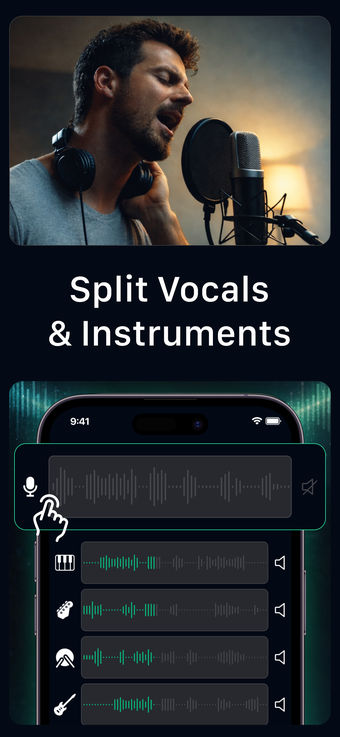
Stem Split - AI Vocal Remover from MUSIC AI STUDIO LTD separates vocals and instruments on iPhone for remixing and practice. It uses AI-powered stem separation to extract vocals, drums, bass, and other instrument stems, producing editable tracks you can export as WAV or MP3. The app pairs a compact mixer view with studio-grade processing and batch import, putting multi-track stem work in your hands. If you create music or content, you can generate backing tracks and samples quickly.

Unlock your creativity with Adobe Stock
Get 10 images or 1 video with a free trial
What is Stem Split used for?
If you need to turn a finished mix into editable parts, Stem Split targets remixing, sampling, karaoke, and rehearsal. The app uses AI vocal removal and multi-stem separation to lift vocals, percussion, bass, and instrumental layers out of a single file, so you can mute, solo, or export individual stems for practice or production. That capability transforms a standard audio file into a multi-track project you can work with on a device.
What audio formats and devices does it handle?
Stem Split accepts audio through several import methods and exports individual stems in common high-quality formats. The tool supports standard workflows for mobile creators, and it runs on iPhone and iPad, requiring iOS 15.0 or later for optimal performance. Be aware that some heavy, AI-intensive separation tasks are processed on the developer's servers, so you may see a mix of local and server-side operations depending on the track.
Is Stem Split better for beginners or studio users?
You can use the app whether you are learning production or refining releases. The simplified workflow removes dependency on complex desktop DAWs, and batch processing helps you prepare multiple tracks at once. Experienced users gain from the cleaner separations that the AI delivers, while newcomers benefit from straightforward controls that let you produce backing tracks without a steep setup.
How good is the export quality?
The app's AI algorithms aim to reduce bleed and artifacts compared with older phase-cancellation approaches, and user feedback highlights clear isolated stems. Exports retain enough fidelity for practice and sampling, and batch output speeds project completion. Expect the most accurate separations when the heavier processing runs on the developer's servers, since the app uses a mix of local and cloud computation for demanding jobs.
Stem Split works as a mobile gateway for stem-based creativity
If you want to experiment with stems on a device before committing to larger production setups, Stem Split offers a pragmatic entry point that gets you usable backing tracks and samples quickly. You should accept some server-side processing for the most precise separations, but for creators who prioritize mobility and fast turnaround, the app makes stem editing accessible and immediately actionable.